Planning & the Training Matrix
The four-step method tells you how to teach a job. It does not tell you which jobs to teach, to whom, or by when. That is a separate question — and answering it well is what separates planned instruction from instruction that happens only when something goes wrong.
The four-step method and the Job Breakdown Sheet tell you how to teach a job. They do not tell you which jobs to teach, to whom, or by when. This section introduces the tool Job Instruction uses to answer that question: the Job Instruction Planning Timetable, often called a training matrix.
By the end of this section, you should understand:
- why instruction has to be planned rather than left to react to events,
- what a Planning Timetable is and the three questions it answers,
- how to build one, mark current capability on a four-level skill scale, and read it for risk and gaps,
- how to review people, performance, and production to anticipate needs,
- how the timetable connects instruction to the real needs of your area.
1Why instruction has to be planned
Before you can teach anything well, you have to decide what is worth teaching, and when. Most supervisors are already systematic about their daily work — schedules, materials, output. Far fewer are systematic about training. Yet training is part of getting the work done, and it can be planned the same way.
The alternative is reactive training: someone quits, someone is out sick, a new product lands, a rush order arrives — and only then does anyone realize that the one person who could do a critical job is gone. By then the instruction is an emergency, done badly under pressure, or not done at all.
Planned instruction means deciding in advance who needs to be able to do which jobs, and by when — before the need becomes urgent.
Planning turns training from an interruption into a routine part of running the area. It lets you give the needed instruction before the problem arises rather than after.
A Planning Timetable is also one of the most useful things you can make when you first take over an area. It forces you to learn, quickly and on one sheet of paper, exactly who can do what — and where you are exposed.
2What the Planning Timetable is
The Planning Timetable is a single sheet that lays out the jobs of your area against the people in it, so you can see at a glance who can do what and what training is needed.
The Job Instruction Planning Timetable is a chart of the jobs in an area against the people in it, showing current capability, the training that is needed, and the date by which it should be done.
A good Planning Timetable answers three questions:
That is the whole purpose. Everything on the sheet exists to answer those three questions and to make the answers visible.
The basic layout is simple:
- Identify the sheet in the corner: name, department, team or shift, date.
- List the jobs or operations across the top — one column per job.
- List the people down the left side — one row per person.
- Mark current capability in the cells where a person and a job meet.
- Set an ideal capacity for each job — the number of people the area needs to be able to do it to meet demand.
- Use a remarks area for dates, notes, and coming changes.
Capability is not all-or-nothing, so the timetable marks it on a four-level scale, shown as a circle filled in quarters:
The more of the circle that is filled, the more you can count on that person for that job. A full circle means more than “trained” — it means the person can pass the job on to someone else.
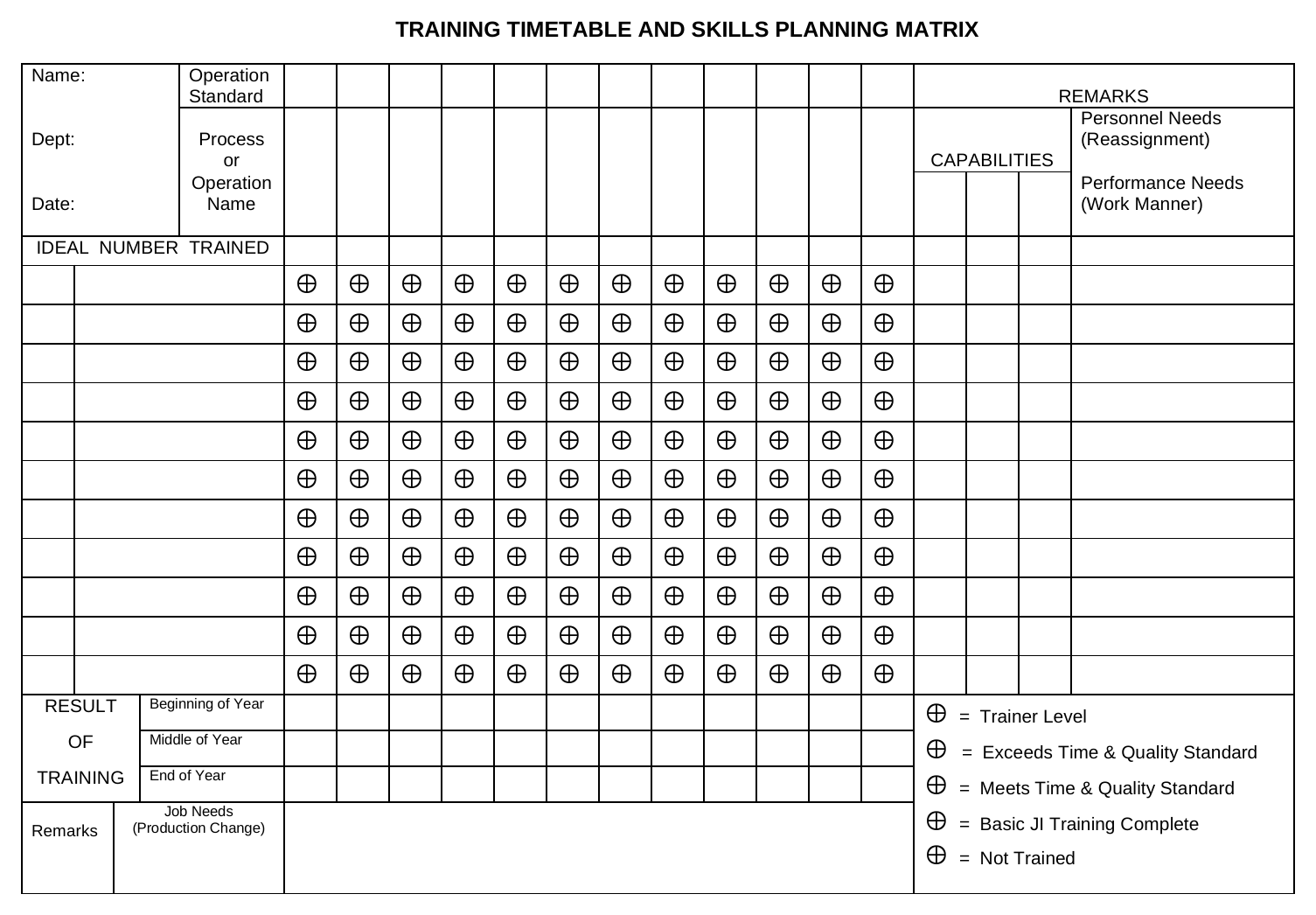
The authentic TWI form. People and operations form the grid; the “ideal number trained” row sets the target coverage for each operation; capability is marked in the cells; and the lower sections track the results of training and the personnel, performance, and job needs that follow from it.
What to notice: the original form marks capability on its own five-level legend (printed at the lower right — trainer level, exceeds standard, meets standard, basic training complete, not trained). The worked example below uses the simpler four-level read introduced above.
| Worker | Job 1 Load & clamp | Job 2 Machine & deburr | Job 3 Assemble | Job 4 Inspect & pack | Remarks |
|---|---|---|---|---|---|
| Ideal capacity | 2 | 3 | 2 | 2 | |
| Operator A | Job 3 not yet to standard — train by Nov 18 | ||||
| Operator B | Finish Job 3 by Nov 23 for coming rush | ||||
| Operator C | Moves to new job — opens a gap on Job 3 | ||||
| Operator D | Train on Job 3 to cover C — full by Dec 10 |
A simplified, filled-in read of the same form. Workers run down the side, jobs across the top, the four-level quarter-circle capability marks in the cells, an ideal-capacity row, and target dates in the remarks column. The figures here are illustrative, not from a real line.
What to notice: the marks in the cells give an immediate picture of strengths and weaknesses — which jobs are well covered and which depend on a single person. The whole point is to make that picture visible before it becomes a problem.
3Building one: an example
The method matters more than any single example, so consider how one supervisor built one for a production line, not the details of any particular line.
A supervisor is in charge of several workers on a line that runs four jobs. The objective is to show the training that needs to be done so the work gets done on time.
The supervisor started a sheet and identified it in the corner:
Then it was built up in order:
- List the jobs done on the line across the top of the sheet.
- List the workers down the left side.
- For each job, decide the ideal capacity — the number of people who should be able to do that job satisfactorily, allowing for rush periods, absences, and other emergencies.
- Mark current capability, using the four-level quarter-circle scale to show how far along each person is on each job.
At that point the supervisor had, very simply, a complete picture of the line — the strengths and weaknesses on any job and just what each person was capable of doing. The filled-in result is the matrix shown above in Figure 5.1.
Read across a row to see what one person can do. Read down a column to see how many people can cover a job — and at what level — and compare that with the ideal capacity at the top. The picture of risk and gaps appears immediately, and that is what you act on next.
Treating the marks as a scorecard of people rather than a map of coverage. The timetable is not there to rank workers. It is there to show you where the area is exposed and what to teach next.
4Reading it for risk and gaps
Once the current picture is marked, the sheet starts telling you things.
- A job only one person can do is a risk. If a single column has just one mark, that job stops the day that person is absent, transfers, or leaves. These single-points-of-failure are usually the first thing to fix.
- A job below its ideal capacity is a gap. Compare the number of capable people in a column with the ideal capacity for that job. If you need three and have two, you have a planned training need, not an emergency waiting to happen.
- A partly filled circle is unfinished business. Someone still learning, or able to do the job only with help, or not yet to standard, needs further instruction before they can be counted on. Only a full circle — can do it and can teach it — closes the job out completely.
- A worker who should be cross-trained shows up as empty cells in rows where, given coming changes, that person ought to be able to step in.
The goal behind all of this is flexibility — enough multi-skilling that the work still gets done when people are absent or demand shifts. The ideal capacity for each job is your guide to how much coverage is enough.
5Anticipating needs
Marking what is shows you today's coverage. To plan, you also have to look at what is coming. Job Instruction does this under three headings — people, performance, and production. You review the area against each in turn and note what you find.
People
Anything that might change who is available:
In the example, the supervisor knew Operator C would move to a new job on a certain date, so noted it against that name — a coming change that would open a gap on the line.
Performance
Whether the people you have are meeting the standard:
In the example, Operator A could do Job 3 only with help and was not yet to standard on it. The supervisor noted that skill as further training needed.
Production
Whether you can meet present and future production commitments:
In the example, the supervisor had been told a new step would be added to Job 3, bringing a rush of work in two weeks, and marked the affected job so the extra coverage would be ready in time.
Reviewing people, performance, and production is not a one-time exercise. Note coming changes on the sheet as you hear about them, and the timetable stays current with very little effort.
6From needs to a plan
Identifying needs is only half the job. The other half — just as important — is deciding what to do and acting on it. For each need the matrix reveals, you answer the same three questions the timetable was built to answer:
The date matters as much as the choice of person. A target date has to leave enough time for the worker to become skilled at the new job before the need is real — not merely to have sat through the instruction.
Working from the example:
- To meet the coming rush on Job 3, the supervisor decided to finish Operator B's training on that job by November 23 — leaving several days to gain experience before the heavy work began.
- Operator A was not yet to standard on Job 3 and needed immediate attention, so the supervisor set that instruction for November 18.
- Operator C's move opened a gap on Job 3, so the supervisor picked Operator D to fill it and set a target to have that operator fully trained by December 10.
Each decision names a person, a job, and a date — and each is entered on the timetable. Making the decision and acting on it is just as important as the analysis that revealed the need.
7Adapting it to your area
The production-line example is only one shape the timetable can take. The method is the same everywhere; the headings change to suit your needs.
- If your area runs a variety of jobs, list the jobs across the top, as in the example.
- If your people all do the same kind of work, the headings might be types of machines or levels of skill.
- In some trades the headings are skills rather than jobs — for a carpenter, things like measuring, sawing, planing, or reading drawings, which apply across many jobs.
Whatever the headings, the logic holds: lay out people against what they need to be able to do, mark where they stand, decide who learns what by when. The timetable connects instruction to the real needs of the area. You plan against it, and then you break down and teach each job with the four-step method.
Section summary
Instruction works best when it is planned, not reactive. The Job Instruction Planning Timetable — the training matrix — is the tool for planning it. It lays the jobs of an area against the people in it, marks current capability on a four-level scale — learning, can do with help, can do to standard, can do and can teach — against an ideal capacity for each job, and makes risk and gaps visible at a glance: a job only one person can do, a job below the coverage it needs, a worker who should be cross-trained.
To plan ahead, you review the area under three headings — people, performance, and production — and note what is coming. Each need then becomes a decision: who should be trained, in which job, by what date, with enough lead time for the person to become skilled before the need is real. The headings adapt to any kind of work, but the method does not change. You plan against the matrix, then break down and teach each job with the four-step method.